


A technical SEO audit checks whether search engines and AI systems can actually find, read and trust your website, covering things like site speed, mobile-friendliness, broken links and how cleanly your pages are coded. Most guides on this topic are written for people who already know what “crawl budget” and “hreflang” mean. This one isn’t.
If you’ve read a technical SEO checklist before and felt like it was written in a different language, that’s not you being behind; it’s the content assuming knowledge most business owners were never taught.
This guide explains what actually matters in 2026, what’s genuinely outdated, and links directly to Google’s own documentation wherever a claim needs proof, not just our word for it.
Table of Contents
- What is a technical SEO audit?
- Can search engines actually find and read your website?
- Is your website fast and easy to use? (Core Web Vitals explained simply)
- Is your website easy to navigate?
- Is your website’s code clean enough for both Google and AI to read?
- What’s changed for AI search specifically?
- What’s genuinely outdated advice in 2026?
- Should you run this yourself or hire a technical SEO audit service?
- In Conclusion
- FAQs
Fast facts
| What it checks | Details |
|---|---|
| What it checks | Whether search engines and AI systems can find, load and understand your site |
| Core Web Vitals thresholds | Page loads in 2.5 seconds or less, responds to clicks in 200 milliseconds, and stays visually stable |
| HTTPS as a ranking signal | Confirmed by Google in 2014, described as “lightweight” |
| Still commonly failing in 2026 | Around 43% of websites fail the responsiveness (INP) threshold |
| What’s newly relevant | Whether AI systems like ChatGPT can actually read and use your content |
| DIY vs hiring | Free tools cover the basics; a paid audit service typically makes sense once your site has 50+ pages or e-commerce checkout flows |
What is a technical SEO audit?
A technical SEO audit is a health check for your website, confirming that search engines and AI tools can access, load, and understand your pages before you worry about anything else, like content or keywords.
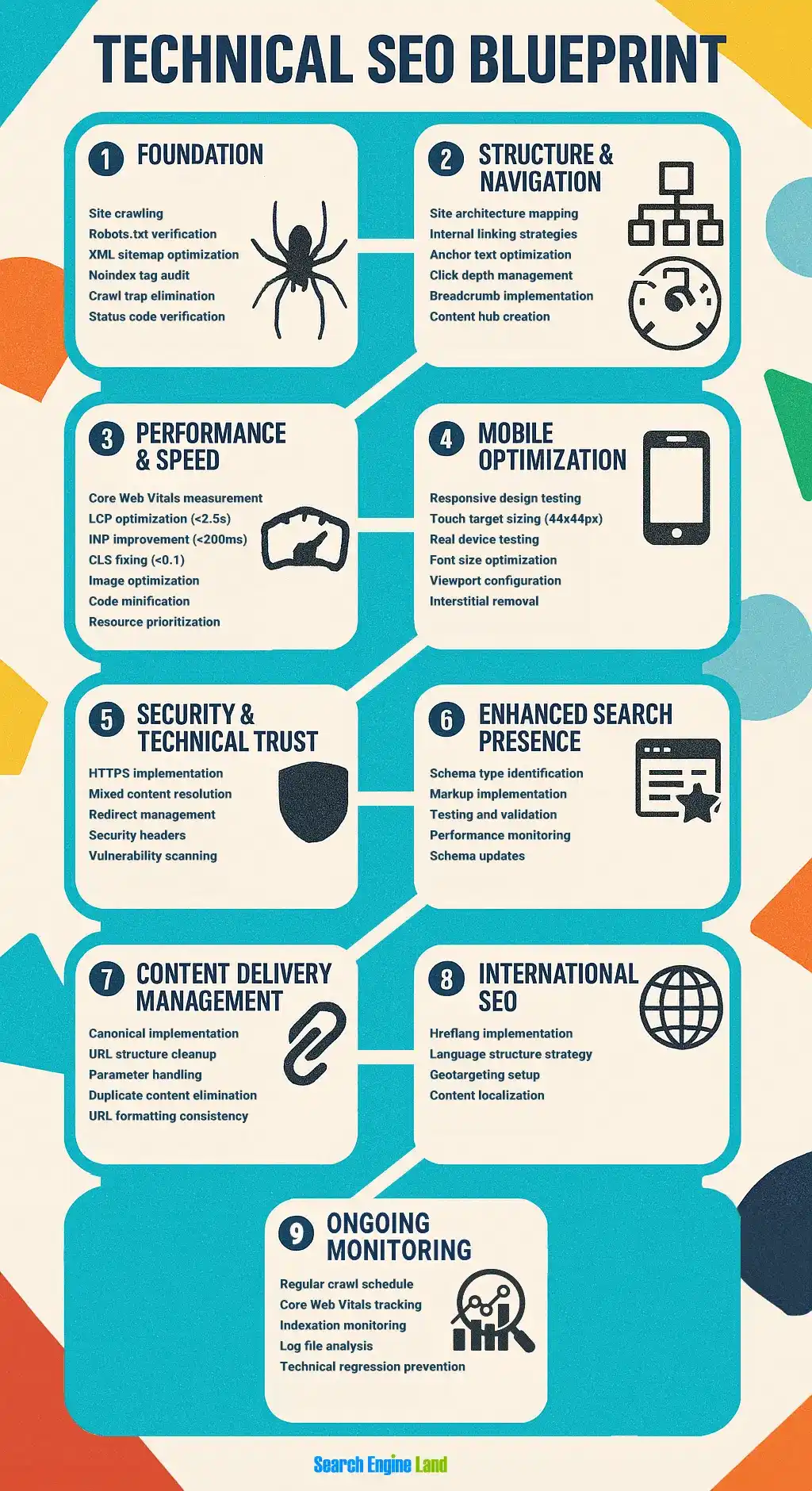
Think of it like a building inspection before you renovate the interior. You can have the most beautiful content in the world, but if the front door is locked, nobody gets inside to see it. That’s essentially what a technical SEO audit checks for:
- Can search engines even find your pages?
- Do your pages load fast enough that people don’t leave?
- Is your site easy to navigate on a phone?
- Is the underlying code clean enough for a machine to actually understand what’s on the page?
A technical SEO audit checklist is simply the list of these checks, done systematically, rather than guessing which one might be the problem.
Can search engines actually find and read your website?
Before anything else works, search engines need to be able to discover your pages and add them to their index, the giant database they search through when someone types a query.
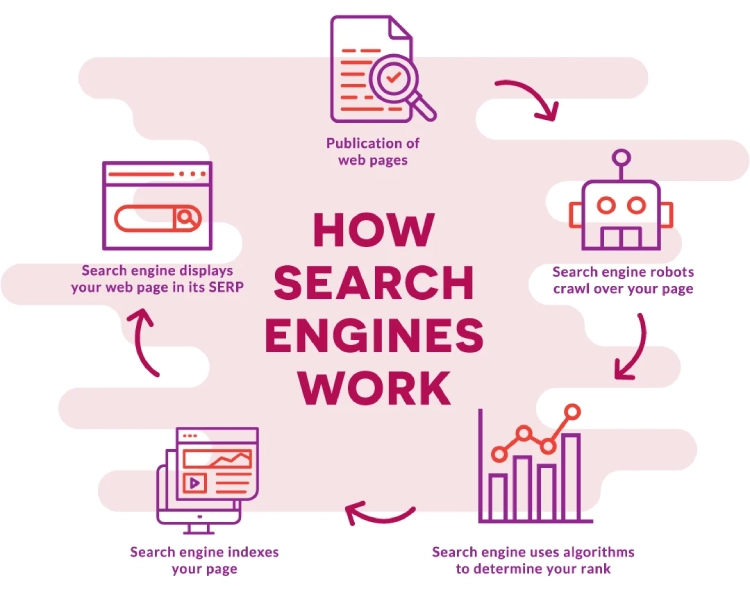
A few checks that matter here, explained simply:
- Is your site indexed? You can check this using Google Search Console, Google’s own free tool. If a page isn’t indexed, it can’t show up in search results, no matter how good it is
- Are you accidentally blocking Google? A file called robots.txt sits on every website and tells search engines which parts they’re allowed to visit. It’s worth checking yours hasn’t accidentally blocked pages you actually want found
- Do your links lead somewhere real? Broken links, ones that lead to a dead page, waste a visitor’s time and can quietly damage how search engines view your site’s quality
- Is your site duplicated by accident? Sometimes a site is technically accessible at four different addresses (with and without “www,” with and without “https”). Search engines can treat these as separate sites unless you pick one and redirect the rest to it
None of this requires technical expertise to understand, even if fixing it sometimes does.
Is your website fast and easy to use? (Core Web Vitals explained simply)
Google measures three things about how your website actually feels to use: how fast it loads, how quickly it responds when someone clicks something, and whether the page jumps around annoyingly while loading. Together, these are called Core Web Vitals.
Here’s what each one means in plain terms, with the official thresholds Google has published on web.dev:
| What it measures | Plain English | Google’s “good” threshold |
|---|---|---|
| Loading speed (LCP) | How long until the main content actually appears | 2.5 seconds or less |
| Responsiveness (INP) | How fast the page reacts when you tap or click something | 200 milliseconds or less |
| Visual stability (CLS) | Whether buttons and text jump around while the page loads | A stability score of 0.1 or lower |
You can check your own site’s scores for free using Google’s PageSpeed Insights tool; just paste in your URL. It’s worth knowing that even in 2026, an estimated 43% of websites still fail the responsiveness threshold, so if your site struggles here, it’s a genuinely common problem, not a sign something is unusually broken.
One honest caveat: Core Web Vitals became a confirmed ranking factor in 2021, but Google has consistently described it as more of a tie-breaker between similarly relevant pages than a dominant factor on its own. A slow site with excellent content can still outrank a fast site with thin content; speed just gives you an edge when everything else is close.
Is your website easy to navigate?
A website should let both people and search engines get from the homepage to any other page in three or four clicks, with a clear, logical structure connecting everything.
A simple way to check this yourself: open your homepage and try to find your way to a random inner page using only the menu and links on the page, no search bar, no typing in a URL. If it takes more than a few clicks or you get lost, search engines are probably struggling too.
A few related basics:
- Internal links matter. Linking between your own related pages helps both visitors and search engines discover content they’d otherwise miss
- Breadcrumbs help. That small trail of links near the top of a page (Home > Category > Page) helps people understand where they are on your site
- Orphan pages are a problem. A page with no links pointing to it from anywhere else on your site is very hard for anyone, human or machine, to find
Is your website’s code clean enough for both Google and AI to read?
The underlying code of your website should clearly label what each part of the page is, a heading, a navigation menu, the main content, so that both search engines and AI systems can accurately understand your page rather than just seeing a wall of undifferentiated text.
This is a genuinely simple concept dressed up in intimidating language. Compare these two ways of building the same webpage:
- Generic code: everything is labelled as a generic “box,” with no indication of what’s a heading, what’s the main content, and what’s just a sidebar
- Descriptive code (called semantic HTML): the heading is labelled as a heading, the navigation is labelled as navigation, the main content is labelled as the main content
A human reading the page sees no difference. A machine trying to understand the page sees a huge difference; one version tells it exactly what matters, the other makes it guess. If you’re not sure which one your website uses, this is a fair question to ask whoever built or maintains your site.
Two other basics worth checking:
- HTTPS: your website address should start with “https,” not “http.” Google confirmed this as a ranking signal back in 2014, and modern browsers now visibly warn visitors when a site isn’t secure
- Schema markup: a bit of hidden code that tells search engines specific facts about your page, like a product’s price or a recipe’s cooking time. It’s not something you need to write yourself, but it’s worth confirming your website has it if you sell products or publish reviews and recipes
What’s changed for AI search specifically?
AI tools like ChatGPT and Google’s AI Overviews read websites using the same crawling technology search engines have always used, so most of the checks above already help your AI visibility too, with two extra things worth checking specifically.
- Check whether you’re accidentally blocking AI crawlers. Some websites have blocked bots like GPTBot or ClaudeBot in their robots.txt file, often without realising it, which, which also keeps them from being cited in AI-generated answers. If you want AI visibility, this is worth checking with whoever manages your site
- Check that your key pages work without JavaScript. Some AI systems struggle to read pages that rely heavily on JavaScript to display content, since they can’t always run scripts the way a browser does. If your returns policy, pricing or FAQ pages only load properly with JavaScript enabled, some AI tools may see a blank page instead
Neither of these requires a separate strategy from good technical SEO. They’re really just an extra reason to get the fundamentals right.
What’s genuinely outdated advice in 2026?
A few practices that used to matter for technical SEO carry far less weight today, and treating them as urgent priorities usually wastes time better spent elsewhere.
Focusing on outdated tactics like aggressive XML sitemap frequency tags, manual pinging, or relentless AMP implementation is not what’s expected from the Technical SEO audit service providers in the market.
Instead, an experienced Digital marketing agency would redirect those resources toward core technical drivers that genuinely move the needle, such as improving real-user Core Web Vitals, fixing critical crawl blocks, and ensuring robust structured data implementation for dynamic search experiences.
- Obsessing over exact keyword placement in meta tags. Search engines understand context and meaning well beyond exact phrase matching now, forcing an exact keyword into a title tag rarely moves the needle the way it once did
- Treating Core Web Vitals as a guaranteed ranking boost. As covered above, it’s a tie-breaker, not a dominant factor. Chasing a perfect score while ignoring genuinely thin content is a poor use of a small budget
- Implementing hreflang tags for a single-market business. Hreflang tells search engines which country or language version of a page to show. If you only serve customers in one country in one language, this simply isn’t relevant to you yet, no matter how often it appears on generic checklists
- Submitting your sitemap to search engines daily. Search engines revisit sites on their own schedule based on how often content actually changes. Submitting a sitemap once, after major changes, is enough for most small business websites
Should you run this yourself or hire a technical SEO audit service?
Free tools like Google Search Console and PageSpeed Insights can identify most basic issues yourself, but a paid technical SEO audit service becomes genuinely worth it once your site has more than roughly 50 pages, an e-commerce checkout flow, or issues you can identify but not confidently fix.
A rough way to think about it:
- DIY makes sense if: you run a small, simple website, have the time to learn the free tools, and mainly need to catch obvious issues like broken links or missing HTTPS
- A technical SEO audit service makes sense if: your site is large or complex, you’ve identified a problem (like slow load times) but don’t know how to fix it technically, or you’re losing traffic and can’t pinpoint why on your own
A proper technical SEO audit service typically includes a full crawl of your site, a prioritised list of issues ranked by actual impact, not just a raw list of every minor flaw, and a plan for fixing them, since a 200-item checklist with no priority order is often more overwhelming than helpful for a business owner trying to decide what to fix first.
In Conclusion
Technical SEO sounds intimidating because the terminology is intimidating, not because the underlying ideas are complicated. Can search engines find your site? Does it load quickly? Is it easy to navigate? Is the code clean enough for a machine to understand? That’s genuinely most of it.
The businesses that get this right aren’t the ones who understand every acronym; they’re the ones who checked the basics regularly instead of assuming everything was fine because the site “looked” fine to a human visitor.
If you’d rather have someone else run this check and tell you exactly what to fix first, Flora Fountain offers itself as a prominent SEO agency in Ahmedabad, built to explain findings in plain language, not just hand over a spreadsheet of jargon. Drop us a line at hello@florafountain.com and let’s find out what might be quietly holding your site back.
Frequently Asked Questions

The founder and partner of Flora Fountain, Shefali leads the Content and Technology divisions. A one-time engineer who started her career writing front-end code, she took a detour sometime during her 9 years in New York, studied journalism and started writing prose, poetry and sometimes jokes. She now has 15...