


![Blog COver Image With text overlay “How to Create a Social Media Calendar in 2026? [Free Guide + Template]”](https://florafountain.com/wp-content/uploads/2026/09/New-Project-64.webp)
A social media calendar is a planning document that lays out what you’re posting, where, and when, across every platform you use, so your team stops deciding what to post the morning it’s due. This guide walks through how to build one properly, and includes a free, ready-to-use Google Sheets template at the end, no signup required.
Most guides on this topic are really just long funnels into a paid tool. This one gives you the actual template first.
Table of Contents
- Fast Facts
- What is a social media calendar?
- What’s the difference between a content calendar and a social media calendar?
- What should a social media calendar actually include?
- How often should you post on each platform in 2026?
- How do you create a social media calendar step by step?
- Free social media calendar template (Google Sheets)
- What tools should you use to manage it?
- How do you stop the calendar from falling apart after week two?
- In Conclusion
- FAQs
Fast Facts
| What it is | A schedule of every social post, by date, platform and status |
| Core fields to track | Date, time, platform, content pillar, copy, asset, status, owner |
| Recommended Instagram frequency | 3 to 5 feed posts a week, 5 to 7 Reels |
| Recommended LinkedIn frequency | 3 to 5 posts a week |
| Recommended planning window | 2 to 4 weeks ahead, with room left for reactive posts |
| Consumer behaviour insight | 81% of consumers say social media prompts them to make spontaneous purchases multiple times a year (Sprout Social Index) |
What is a social media calendar?
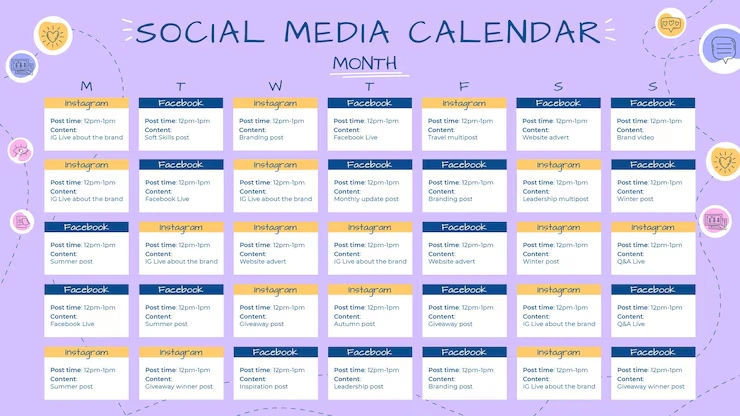
A social media calendar is a forward-looking schedule that shows every post you plan to publish, organised by date, platform, and status, so your whole team can see what’s going out without guessing.
It typically lives in a spreadsheet, a shared document or a dedicated planning tool. What matters isn’t the format; it’s whether it answers three questions at a glance: what’s going live, when, and who’s responsible for it. A calendar that can’t answer those three quickly isn’t doing its job, no matter how detailed it looks.
What’s the difference between a content calendar and a social media calendar?
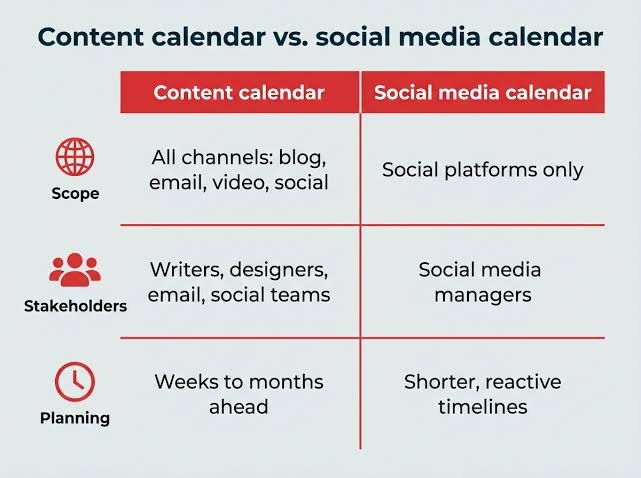
A content calendar covers every type of content a business produces: blogs, emails, videos and social posts. A social media content calendar covers only social platforms, tracking details unique to each one, such as captions, hashtags, and platform-specific formats.
Think of the content calendar as the parent document and the social media calendar as one focused piece of it. If your business only publishes to social platforms, the two are effectively the same thing. If you also run a blog or email newsletter, keeping them separate, but cross-referenced, usually works better than cramming everything into one view.
What should a social media calendar actually include?
A working social media calendar needs, at minimum, the publish date, time, platform, caption, visual asset, status and the person responsible; everything else is a bonus that helps with organisation and reporting.
The core fields worth tracking:
- Publish date and time: When the post goes live
- Platform: Which network it’s built for
- Post format: Reel, carousel, static image, Story, text post
- Caption or copy: The final, approved wording
- Creative asset: The image, video or design attached
- Content pillar or campaign: Which theme or initiative it supports
- Status: Idea, draft, in review, approved, scheduled or published
- Owner: Who’s responsible for creating or approving it
- Link and CTA: The destination URL, ideally tagged with UTM parameters so it feeds clean data back into your analytics
Different platforms benefit from slightly different extra fields too. Instagram posts benefit from tracking hashtags and collaborators, LinkedIn posts benefit from tracking the point of view or angle, and Pinterest needs pin titles and descriptions tracked separately from the main caption.
How often should you post on each platform in 2026?
Posting frequency varies significantly by platform, ranging from 1 to 2 YouTube videos a week up to 5 to 10 Threads posts a day, and consistency matters more than hitting the top end of any range.
Current recommended starting points:
| Platform | Recommended frequency |
|---|---|
| Instagram (feed) | 3 to 5 posts/week |
| Instagram Stories | 7 to 15/week |
| 3 to 5 posts/week | |
| 3 to 5 posts/week | |
| X (Twitter) | 10 to 20 posts/week |
| TikTok | 5 to 7/week |
| YouTube | 1 to 2/week |
| Google Business Profile | 1 to 3/week |
These are starting benchmarks, not fixed rules. If you can’t sustain the top end of a range without dropping quality, post less often and keep it consistent instead. A brand that reliably posts three times a week beats one that posts daily for two weeks and then goes silent for a month.
How do you create a social media calendar step by step?
Building a social media calendar means defining your goals and platforms first, then setting a realistic posting cadence, organising your content into themes, and only then choosing the tool you’ll manage it in.
- Define your goals and audience: Decide what you actually want: brand awareness, engagement or lead generation, before planning a single post
- Choose your platforms: Pick 2 to 3 platforms where your audience is genuinely active rather than trying to maintain a presence everywhere
- Set your content pillars: Group your content into 4 to 6 recurring themes: educational, behind-the-scenes, product, social proof, so your feed doesn’t feel random
- Set a realistic posting cadence: Use the frequency table above as a starting point, adjusted to what your team can actually sustain
- Build the calendar structure: Set up your fields: date, platform, copy, asset, status and owner, in whichever format you’ll actually use
- Establish an approval workflow: Decide who creates, who reviews and what happens if someone’s away, before content gets stuck waiting on a single person
- Schedule, publish and review: Once live, track which formats and posting times actually perform, and adjust the calendar based on real data, not assumptions
Free social media calendar template (Google Sheets)
The template attached to this guide is a ready-to-use spreadsheet with the core fields already built in, a filled-out example row, and a second tab covering posting frequency and content pillar splits. Download it, open it in Google Sheets or Excel, and start filling it in immediately.
It includes:
- A main Content Calendar tab with columns for date, time, platform, content pillar, post type, caption, visual notes, hashtags, link, status, owner and notes
- Dropdown menus for platform and status, so entries stay consistent as your team fills it in
- A second Frequency & Pillars Guide tab with the posting frequency benchmarks above and a sample content pillar split you can edit to match your own brand
Unlike most “free template” offers that require an account sign-up before you can actually use anything, this one is a direct download, no login, no trial, no email gate.
What tools should you use to manage it?
A spreadsheet or Google Sheets template works well for individuals and small teams, while a dedicated social media management platform becomes worth the cost once you’re coordinating multiple people, clients or approval steps.
A practical way to think about it:
- Spreadsheets and Google Calendar: Free, familiar, and genuinely fine for a solo marketer or a very small team, but collaboration gets messy once more than two or three people are editing the same file
- Notion or similar workspace tools: Flexible and customisable, good if your team already lives there, though you’ll still need a separate tool to actually publish
- Dedicated social media management platforms: Worth the investment once you’re managing multiple clients, need structured approval workflows, or want scheduling and analytics in the same place you’re planning
There’s no universally “best” tool. The right choice depends entirely on your team size and how many approval steps your content actually needs, not on which platform has the flashiest feature list.
How do you stop the calendar from falling apart after week two?
A social media calendar stays useful when it’s treated as a living, editable document rather than a one-time setup, reviewed and adjusted regularly based on what’s actually performing, not left untouched until it no longer reflects reality.
A few habits that keep a calendar alive rather than abandoned:
- Batch your content creation: Planning and creating a week or two of content in one sitting is far more sustainable than trying to produce something fresh every single day
- Leave room for reactive content: Don’t fill every single slot in advance; leave space for trending topics or timely moments that a rigid calendar would otherwise miss
- Review performance monthly, not just quarterly: Checking what’s actually resonating lets you adjust your content pillar mix before a full quarter of underperforming content piles up
- Keep approval steps to a minimum: Every extra layer of sign-off is another place content can quietly get stuck
A calendar someone has to fight with every week gets abandoned. A calendar that flexes with reality gets used for years.
In Conclusion
A social media calendar isn’t really about the spreadsheet or the tool, it’s about removing the daily scramble of deciding what to post and replacing it with a system your whole team can see and trust. Get the structure right once, and every week after that gets easier, not harder.
If building and managing this consistently isn’t something your team has the bandwidth for, Flora Fountain works as a Social media marketing agency for exactly this kind of ongoing planning and execution. Drop us a line at hello@florafountain.com and let’s build a calendar your brand will actually stick to.
Frequently Asked Questions

Vasim Samadji is a partner at Flora Fountain, where he leads the Business and Marketing Strategy divisions. In a world where everyone is used to sugarcoating, his directness is often considered rude. But that shouldn't be a problem if you like the no-nonsense approach. Because he is a seasoned professional...