


Guess what? Instagram carousels get 1.4x to 3.1x more reach than single-image posts! Mind-blowing, right? What started as a simple feature to share multiple photos has evolved into one of the most powerful storytelling formats on social media.
Think about it: you’re scrolling through Instagram and a carousel catches your eye. The first slide hooks you and before you know it, you’ve swiped through all 10 slides, completely absorbed in the story. That’s the magic we’re talking about! Instagram carousels aren’t just about showing more content; they’re about creating an experience that guides your audience through a narrative journey.
The best part? Brands of all sizes, from local cafes to global corporations, are using carousel storytelling to build deeper connections with their audiences. Whether you’re a startup finding your voice or an established brand looking to innovate, this guide will help you master the art of carousel storytelling. Ready to transform your Instagram strategy with the help from a leading social media marketing agency ? Let’s not waste any more time and dive in!
Table of Contents
- Why carousel storytelling matters for your brand
- Understanding the psychology of swiping
- 6 proven carousel storytelling formats
- How to structure your carousel story
- Design principles for swipeable content
- Common carousel mistakes to avoid
- Tips for maximising carousel performance
- Conclusion
- Frequently Asked Questions
Why carousel storytelling matters for your brand
Here’s something that might surprise you: 70.3% of social media professionals say carousels are their best-performing content type! But why exactly should your brand invest time in creating carousel stories?
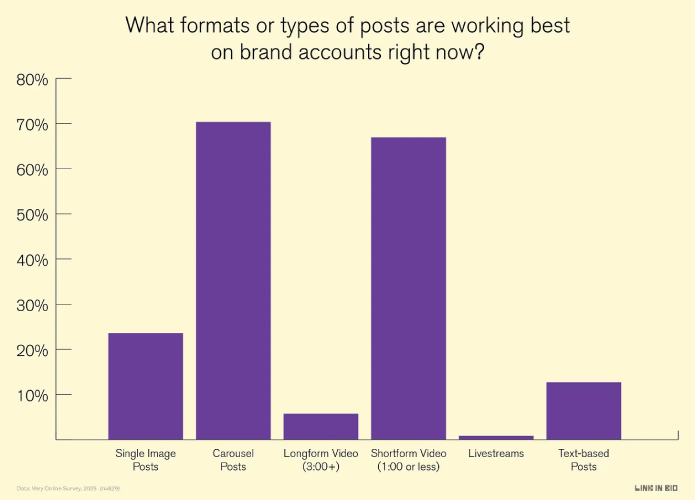
Caption: Source: Link In Bio
The answer lies in how Instagram’s algorithm works. Carousels receive multiple ranking opportunities. When someone doesn’t swipe through all your slides, Instagram may resurface those unseen slides as “new” content in their feed. It’s like getting a second chance at making a first impression! Plus, carousels that include music show up in the Reels tab, giving you even more visibility.
But beyond the algorithm benefits, carousel storytelling creates genuine engagement. When you guide someone through a narrative, whether it’s a product transformation, a step-by-step tutorial, or a compelling brand story, you’re holding their attention for longer. This extended engagement signals to Instagram that your content is valuable, pushing it to even more users.
A social media marketing agency recently analysed over 10,000 carousel posts and found that story-driven carousels generate 2.3x more saves than random photo dumps. Why? Because stories are memorable. They create emotional connections. They make people want to bookmark your content and share it with friends.
View this post on Instagram
Think about brands like Jellycat, Nude Project, or Gentle Monster. They’ve become known for their distinctive carousel strategies. Their feeds aren’t just collections of posts; they’re visual stories that unfold with each swipe. That’s the power of intentional carousel storytelling and it’s exactly what we’ll help you achieve.
Understanding the psychology of swiping
Ever wondered why you can’t resist swiping through a well-designed carousel? There’s actual psychology behind it! Our brains are wired to complete what we start. It’s called the Zeigarnik Effect. When you see those little dots at the bottom of a carousel indicating more slides, your brain experiences a mild form of tension that can only be resolved by swiping through to the end.
View this post on Instagram
This curiosity gap is your secret weapon. The first slide creates a question or promise and subsequent slides deliver the answer or payoff. It’s the same principle that makes us binge-watch TV series or read “just one more chapter” in a book. You’re essentially creating micro-cliffhangers that keep people engaged.
Understanding this psychology helps you craft carousels that feel irresistible. It’s not manipulation; it’s creating content that naturally aligns with how people want to consume information on Instagram. When you respect your audience’s time and reward their swipes with valuable, engaging content, everybody wins!
6 proven carousel storytelling formats
Now let’s get practical! Here are six carousel formats that consistently perform well for brands. Each format tells a different type of story, so choose based on your content goals:
Before/After Transformations
This format is storytelling gold! Show the journey from problem to solution across your slides. Slide 1 sets up the “before” state, middle slides show the transformation process and the final slide reveals the “after” result. Beauty brands, home decor companies and fitness coaches crush it with this format. The key is building anticipation. Don’t rush to the reveal too quickly.
Step-by-Step Tutorials
Break down complex processes into simple, digestible steps. Each slide should cover one clear action, making it easy for viewers to follow along. Adobe does this brilliantly with their design tutorials. One slide, one technique, crystal clear instructions. This format positions you as an expert whilst providing genuine value that people want to save and reference later.
Listicles with Visual Storytelling
“5 Ways to…” or “10 Tips for…” posts work beautifully as carousels. But here’s the trick: don’t just list items. Create a visual hierarchy where each slide builds on the previous one. Headspace excels at this, turning wellness tips into cohesive visual journeys rather than disconnected bullet points.
Data Storytelling with Infographics
Got statistics or research to share? Transform dry data into a visual narrative! Start with a compelling headline on slide 1, break down the data across middle slides using charts and graphics and end with actionable takeaways. An experienced digital marketing company uses this format to share industry insights and the engagement rates are consistently 3x higher than text-only posts.
Behind-the-Scenes Chronicles
Take your audience on a journey inside your brand. Show the process behind your products, introduce team members, or reveal how decisions get made. Nike and Vans master this format, making followers feel like insiders. This builds trust and humanises your brand in ways single images can’t achieve.
Problem-Solution Narratives
Start by acknowledging a pain point your audience experiences (slide 1), explore why this problem exists (slides 2-3), introduce your solution (slides 4-6), show proof it works (slides 7-8) and end with a call-to-action (slide 9-10). This format follows the classic story structure and naturally leads viewers towards conversion.
How to structure your carousel story
Creating a compelling Instagram carousel strategy isn’t just about pretty slides; it’s about thoughtful structure. Think of your carousel like a mini-movie with a clear beginning, middle and end. Here’s how to nail the structure:
The Hook (Slide 1): You have 1.3 seconds to capture attention. Your first slide must stop the scroll! Use bold headlines, surprising statistics, provocative questions, or striking visuals. Avoid generic statements. Be specific and intriguing. For example, instead of “Marketing Tips,” try “The 1 Instagram Mistake Costing You 10K Followers.”
The Build-Up (Slides 2-5): Once you’ve hooked them, deliver on your promise. Each slide should reveal something new whilst maintaining momentum. Use transitional phrases like “But here’s the twist…” or “Here’s where it gets interesting…” to create flow between slides. Think of this section as rising action. You’re building towards something.
The Climax (Slides 6-8): This is your payoff moment! Deliver the most valuable information, the transformation reveal, or the key insight. Whatever you promised in slide 1, make sure these slides fulfil that promise completely. Don’t hold back. Give your audience the goods!
The Resolution (Slides 9-10): Tie everything together with actionable next steps or a compelling call-to-action. What should viewers do with this information? Should they save the post, tag a friend, visit your link in bio, or try the technique themselves? Make it crystal clear and easy to execute.
Pro tip: Always include a summary or key takeaway on your final slide. People appreciate having the main points condensed and it makes your carousel more save-worthy!
Design principles for swipeable content
Let’s talk design, because even the best story falls flat with poor visuals! Here are the principles that separate amateur carousels from professional ones:
- Visual Consistency: Maintain the same colour palette, fonts and design elements throughout all slides. Your audience should instantly recognise your content. Bumble India does this perfectly with their signature yellow and consistent typography. This cohesive look makes your carousel feel like a unified experience rather than random slides thrown together.
- Readable Typography: Instagram users are often scrolling quickly, so your text needs to be instantly readable. Use large, bold fonts for headlines (minimum 60pt) and clear, simple fonts for body text (minimum 24pt). Avoid script fonts or anything too decorative. White text on dark backgrounds or dark text on light backgrounds works best. High contrast is your friend!
- Strategic Use of White Space: Don’t cram every inch with content! White space (or negative space) gives your design room to breathe and makes information easier to process. Each slide should have one main focus. If you’re trying to communicate too much per slide, split it into two slides instead.
- Progressive Disclosure: Reveal information gradually across slides. Don’t dump everything on slide 2! Think about pacing. Vary between text-heavy slides and image-heavy slides to maintain visual interest. This rhythm keeps people engaged and prevents fatigue.
- Compelling Cover Slide: Remember, your first slide appears in the feed and determines whether people will swipe. Make it visually arresting! Use the rule of thirds, incorporate movement or action and include a clear, benefit-driven headline. Test different cover slides to see what resonates with your audience.
- Visual Continuity Tricks: Create “bridges” between slides using consistent design elements, colours that flow from one slide to the next, or even split images across multiple slides. This technique encourages swiping because viewers want to see how the visual completes itself.
Common carousel mistakes to avoid
Even experienced brands make these carousel blunders. Learn from their mistakes so you don’t have to make them yourself!
Mistake #1: No Clear Story Arc
Posting random, unconnected slides is the biggest carousel sin. Each slide must connect to the next with a logical flow. If someone could shuffle your slides and it wouldn’t matter, you don’t have a story. You have a collection.
Mistake #2: Weak First Slide
If your cover slide doesn’t grab attention, no one will swipe. Avoid generic statements, boring visuals, or text-heavy designs on slide 1. Make it irresistible!
Mistake #3: Too Much Text
Trying to cram paragraphs into each slide overwhelms viewers. Stick to one key point per slide with 15-20 words maximum for body text. If you need more explanation, use the caption!
Mistake #4: Inconsistent Branding
Switching fonts, colours, or styles mid-carousel looks unprofessional and confusing. Decide on your design system before creating your carousel and stick with it throughout.
Mistake #5: No Call-to-Action
Don’t leave people hanging at the end! Your final slide should always include a clear next step, whether that’s “Save this for later,” “Tag someone who needs this,” or “Visit link in bio.”
Mistake #6: Ignoring Mobile Optimisation
Instagram is primarily a mobile platform. Always preview your carousel on a phone before posting. What looks good on a desktop might be unreadable on mobile. Test your designs on actual devices!
Mistake #7: Posting Without Testing
Don’t assume your first version is perfect. Create multiple carousel drafts, test different hooks and analyse which versions resonate most. Even small changes in wording or imagery can significantly impact performance.
Tips for maximising carousel performance
Ready to take your carousel game to the next level? These advanced tips will help you squeeze every bit of engagement from your storytelling efforts:
Optimise for the Algorithm
Post your carousels when your audience is most active. Check your Instagram Insights to find peak engagement times. Include location tags to increase discoverability on Explore pages. Use 3-5 relevant hashtags (yes, fewer is better now!) mixed between broad and niche terms. A social media marketing agency can help identify the optimal hashtags for your specific audience.
Leverage the First 3 Seconds
Instagram users decide whether to engage within 3 seconds. Your opening slide must communicate value instantly. Use numbers, specific outcomes, or intriguing questions. “Boost Engagement by 156%” beats “Engagement Tips” every time.
Create Save-Worthy Content
Saves are currently one of Instagram’s strongest ranking signals. Create carousels people want to reference later: tutorials, checklists, resource lists, or frameworks. Add text like “Save this for later!” on your final slide to encourage that action.
Use Music Strategically
Adding trending audio to your carousel makes it eligible for the Reels tab, dramatically increasing reach potential. Choose background music that matches your brand vibe and doesn’t distract from your visual story.
Encourage Full Swipe-Through
Place value throughout all slides, not just at the beginning. If people stop swiping at slide 3, you’re losing engagement. Create curiosity gaps, tease upcoming information, or use visual continuity to encourage completion.
Repurpose Top Performers
When a carousel performs exceptionally well, don’t let it disappear into your archive! Repost it after 60-90 days (when it won’t feel repetitive), or adapt the concept into different formats. Your best carousels deserve extended life.
Test and Iterate
Track metrics like reach, saves, shares and swipe-through rate (available in Instagram Insights). Which carousel formats perform best? What hooks generate the most engagement? What topics resonate most? Let data guide your strategy evolution.
Engage in the Comments
Respond to comments quickly. It signals to the algorithm that your post is generating conversation. Ask questions in your caption to encourage commentary. The more dialogue your carousel generates, the further Instagram will push it.
Conclusion
In the dynamic world of Instagram marketing, carousel storytelling has emerged as one of the most effective ways to capture attention, build connections and drive meaningful engagement.
The key takeaway? Carousels aren’t just multiple images. They’re narrative experiences that guide your audience on a journey. When executed with intention, they transform casual scrollers into engaged community members and ultimately, loyal customers.
Now it’s your turn to put these strategies into action! Start with one carousel format that aligns with your brand goals, apply the design principles we’ve covered and watch your engagement soar. Need expert guidance to elevate your Instagram presence? A leading social media marketing agency which specialises in crafting scroll-stopping content that converts can definitely help with getting the ball roling.
Frequently Asked Questions

Vasim Samadji is a partner at Flora Fountain, where he leads the Business and Marketing Strategy divisions. In a world where everyone is used to sugarcoating, his directness is often considered rude. But that shouldn't be a problem if you like the no-nonsense approach. Because he is a seasoned professional...