


That video has been a labor of love for you. The images are still awesome. The information still matters. However, what happens is an explosion of price points that are no longer current, language that seems hopelessly quaint, or a deal that was great two years ago. The content was good; now it seems ancient.
This is surprisingly often the case for creators, marketers, and brands building libraries of long-term content. Video is visual and intended to have long-term value, but subtitles are often time-based, tying video to a particular moment in time. This is where smart content management plays its part.
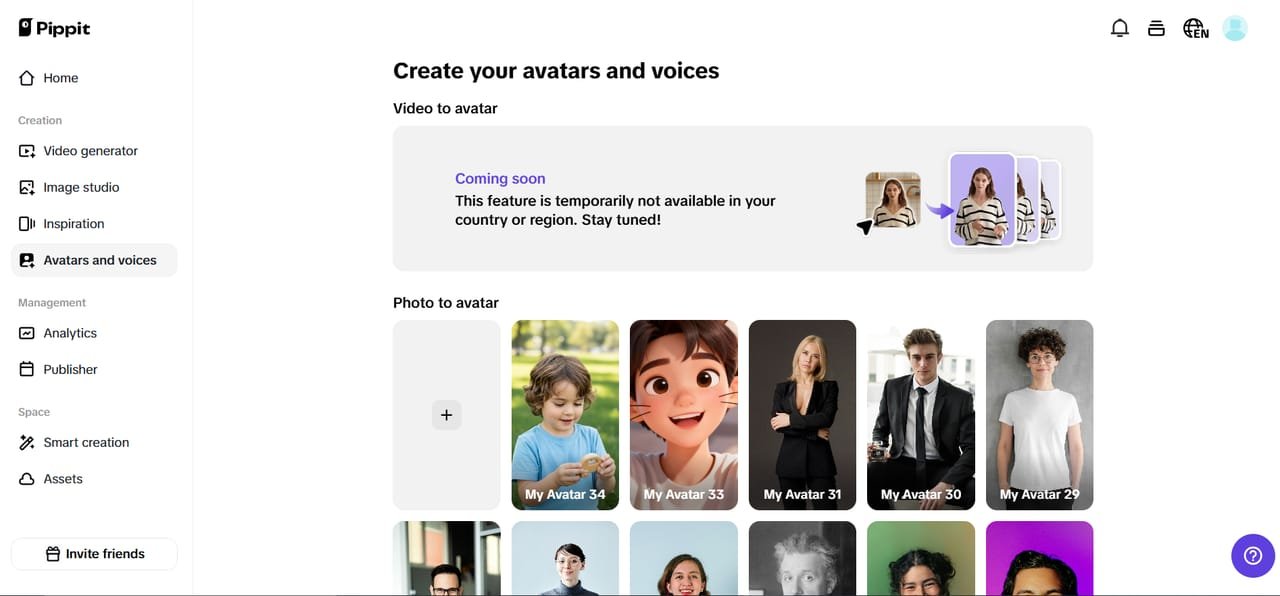
With the help of tools such as Pippit, the creators are reworking the manner in which they can ensure their videos are future-proof from the outset. This is achieved through the help of an AI storyboard generator in planning the storytelling of the video in a visual format, with the help of optional text on the video screen.
Now, let’s talk about what happens to captions with time and how removing them can revive your evergreen content.
The internet never forgets…, except your discount code
Slang evolves, prices change, campaigns end. What felt timely and clever at launch can become awkward or misleading months after the fact.
Here’s a list of the most common culprits in captions that don’t age well:
Flash-sale prices that freeze time
“Only $9.99 today!” works great—until today becomes last year. Suddenly, your video creates confusion instead of urgency.
Trendy slang that has an expiration date for its use
Internet language moves fast. Words that once felt fun can quickly feel cringe or unclear to new audiences.
Platform-specific promotions
The links in bio, swipe up, or campaign hashtags make no more sense when the video is reused somewhere else. The frustrating part? The video itself is usually still strong. The visuals, pacing, and core message haven’t expired-only the text has.
Why re-editing from scratch is the wrong fix
The traditional response to outdated captions is full re-editing. New timelines. New exports. New versions for every platform.
That approach wastes time and energy, as well as creative momentum. Worst of all, it often means different versions of the same content are floating around online. A better approach is the concept of selective cleanup. Instead of re-creating the video from scratch, you get rid of what doesn’t belong. When you remove text from video, you regain flexibility without undermining the original creative effort.
Evergreen content needs annual maintenance.
Visualize videos like the window of a storefront. The display case is the same, yet the advertising signs change.
Through viewing aged videos periodically and removing the texts that are sensitive to timing, you can:
-
Repurpose for use in other campaigns
-
Extending the life of high-performance videos
-
Represent your brand accurately without having to re-record any footage
It’s not about removing history. It’s about making your content relevant.
From archive to active: Bringing old videos back to life
The moment captions are gone, something interesting happens. The message is more universal.
A tutorial is timeless in nature. Product demos turn into flexible. Brand storytelling does feel more personal and less like promotion. However, this provides an opportunity for the redistribution of video material to the new platforms, regions, or for a whole different audience.
A smart refresh without starting over: How Pippit fits in
Upgrading established videos does not have to be an exercise in digital archaeology. Pippit was engineered for producers who desire control but don’t want it to come with complications.
But if you find yourself sitting in a library of “almost useful” videos, this is when things get interesting.
The clean-slate approach: Revitalizing videos without reconstructing them
Before going through the process in depth, envision the following process and then return to the tutorial: “Upload your old video, strip away the outdated overlays, perhaps reframe a few shots, and you’re ready to export a new version without re-editing or re-shooting a single frame.
Here’s what that would entail using Pippit
Step 1: Start the video editor and introduce the past
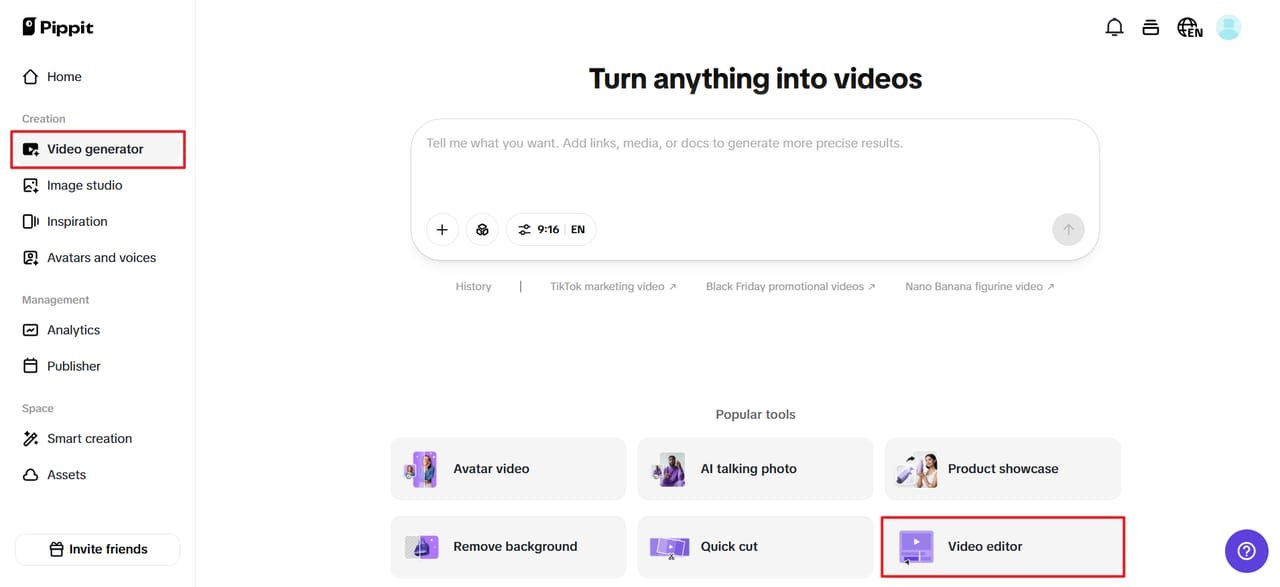
In order to remove video from free video AI, one has to register for a free trial offer from Pippit with a Google, TikTok, or Facebook login, and then select “Video Generator” and “Smart Tools” from the left sidebar. Next, select “Video Editor” and browse your video from PC “Click to Upload.” This is all about access; your material is fully editable at this point.
Step 2: Remove old and outdated text descriptions and enable flexibility
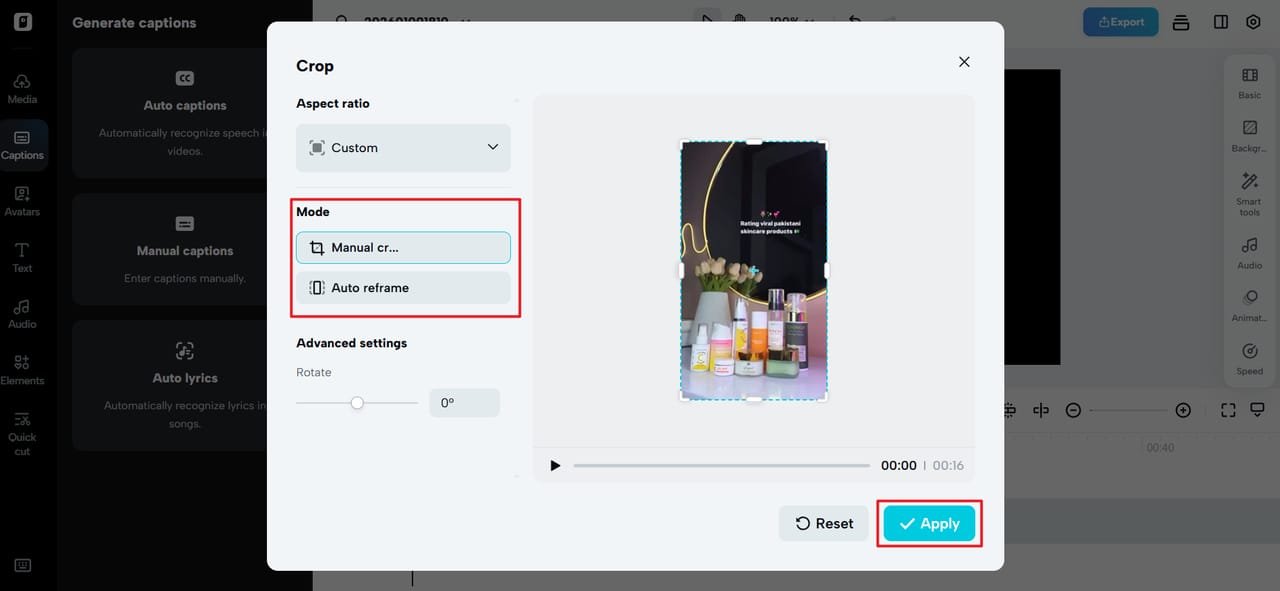
Click Select Smart Tools, and then choose Auto Reframe from the dropdown menu. Now, choose the Aspect Ratio and then click Manual Crop or Auto Reframe to remove the watermark, font, and caption from the video and resize it to your preference.
You can also click ‘Remove Background’ and enable ‘Auto Remove’ to remove the background with the text. You can then click ‘Background’ and choose a solid color or move on to ‘Elements’ to overlay a stock video or picture in the background. In minutes, your video will no longer be linked to any particular time or offer.
Step 3: Export and reintroduce your content to the world
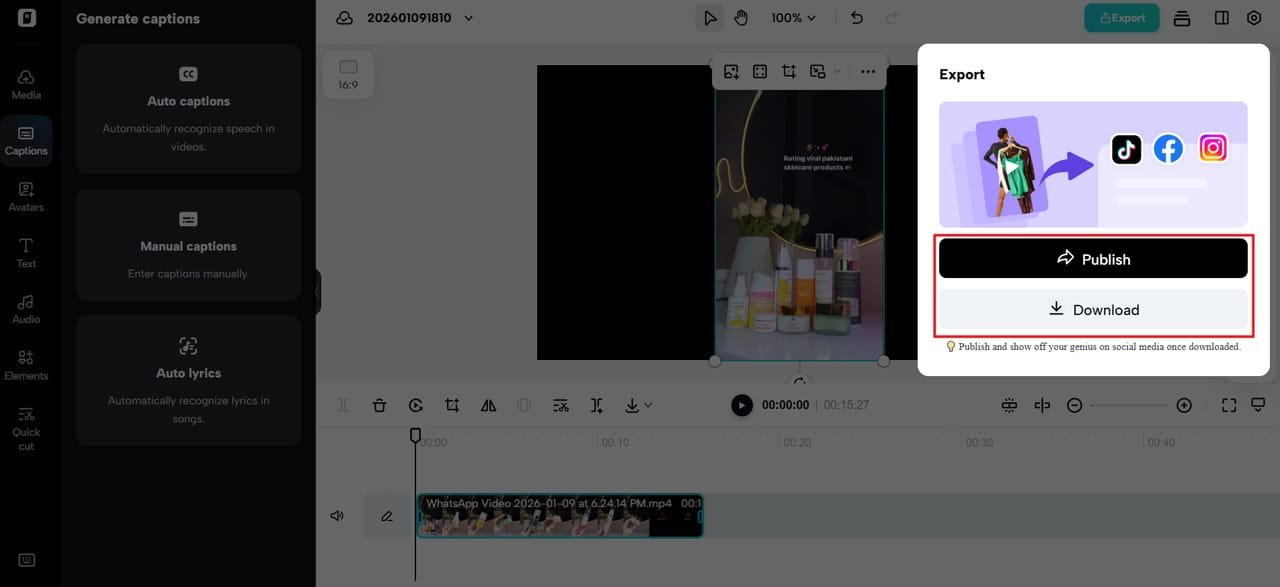
Click “Export” (top-right corner) and select “Publish” or “Download.” Customize the export options and click “Export” to download the video to your PC or share it on social media. What you publish now is familiar—but but fresh, accurate, and reusable.
Design for change, not permanence
Removing captions will allow you to think differently about adding context in the future. Most creators rely on adaptable visual layers or voiceover updates rather than hard-coded text.
Applications such as a transparent background maker give you opportunities for flexible design elements, which can be easily interchanged or removed afterward without having to mess with the core footage. The goal is modular content: living, breathing videos.
The long game: Treating videos as ever-living assets
Evergreen content is not “set it and forget it.” It’s “build it, then maintain it wisely.”
You save significant time and effort by periodically cleaning out-of-date captions instead of re-editing from scratch.
-
Save Time
-
Protect Brand Credibility
-
Maximize return on every piece of content you’ve already created
That’s not just efficient, it’s sustainable.
Final Take: Update Smarter, Not Harder
Captions will always age faster than visuals. That’s just the way it works in digital culture. But outdated text needn’t send your videos into retirement.
Refreshing old content is a creative tune-up, not a technical overhaul, with Pippit. You hold on to what still works and remove what does not; you give your best videos the longevity they so deserve.
If your library is full of so many great ideas trapped behind expired captions, now’s the time to unlock them. Launch Pippit, clear the mess, and enable your evergreen videos to go to work for you once again.

The founder and partner of Flora Fountain, Shefali leads the Content and Technology divisions. A one-time engineer who started her career writing front-end code, she took a detour sometime during her 9 years in New York, studied journalism and started writing prose, poetry and sometimes jokes. She now has 15...